Building a Personal Language Tutor
The problem
Personal software tailored to your needs is becoming cheaper than ever to build. I’ve been dipping in and out of learning Korean for a number of years but have struggled to maintain consistency and constant progression. I originally followed methodologies such as MIA, Refold and Migaku, which were all centred around immersion learning. Between constant SRS burnout, sentence mining workflows and a struggle to stay consistent with my habits, I wanted an accessible way to interact with the language that I could customise to my preferences.
I came up with the idea of building a Korean tutor (agent) that I can message directly. It would find expressions from Korean content I like, explain them, help me practise them and remember what I want to work on.
The idea
The approach takes inspiration from Refold, Migaku and other common immersion learning techniques: learn through content you’re interested in, pick out I+1 material based on comprehension ability, and revisit it. The core focus of this agent was to help with input workflows, so there's no current emphasis on outputting methodologies.
I essentially wanted an agent to help with that process: find something worth studying in content I already enjoy, explain it in context, and keep track of it for next time. It could then feed snippets back to me to mimic an SRS.
The agent architecture
I chose to tackle this by building a custom agent. Vercel’s Eve framework lets me define the agent’s behaviour and tools, and I could see myself easily customising scheduled tasks, skills and connections through the framework.
The basic components for the agent/tutor are:
- Eve runs the agent, tools, and scheduled lessons.
- Gemini handles responses through Vercel AI Gateway.
- Supermemory stores learning context between conversations.
- Telegram is where I talk to it.
- Vercel hosts it.
The tutor’s behaviour lives in a Markdown file. It includes preferences like using natural spoken Korean, skipping romanisation, and keeping corrections short. The default is mostly Korean, with English for explanations.
Two skills handle the main workflows: finding new expressions and reviewing existing ones. Each skill gives the agent instructions for the task; tools let it search, inspect videos, and access memory.
Eve appealed to me because I could build the agent in TypeScript, with tools, channels and scheduled tasks defined in code alongside the Markdown instructions. That made it easy to customise the tutor as I went, using familiar functions and types.
For example, here’s a simplified version of the daily lesson schedule:
import { defineSchedule } from "eve/schedules";
import telegram from "../channels/telegram.js";

export default defineSchedule({
  cron: "0 22 * * *",
  async run({ to, waitUntil, appAuth }) {
    const chatId = process.env.TELEGRAM_CHAT_ID;

    waitUntil(
      to(telegram, { chatId }).send(
        "Load the daily-lesson skill and review my current Learning items.",
        { auth: appAuth, turnPolicy: "queue" },
      ),
    );
  },
});
defineSchedule gives TypeScript the information it needs to infer the handler’s parameters. The configuration check also narrows chatId to a non-empty string before it’s used. The schedule runs at 22:00 UTC, sending the agent a prompt to use the same lesson skill I can trigger through chat. In Melbourne, that’s 8 am during standard time or 9 am during daylight saving.
Remembering what I’m learning
The tutor uses Supermemory to store learning context between conversations. The idea is that the tutor should be aware of what I currently know and what I am currently learning.
The tutor keeps one learning list with three states:
- Unseen: something it’s found that I haven’t started studying.
- Learning: something I want more practice with.
- Seen: something I recognise and don’t need recommended to me.
“Seen” leaves room for forgetting. I can ask to move an expression back into Learning, and one correct answer doesn’t automatically take it out.
These updates currently depend on the model following instructions. That’s a limitation I’ll need to watch as the list grows.
Supermemory also keeps track of content that I enjoy. Think preferred YouTube channels, Naver articles or topics, and social media accounts I like. These preferences help guide the agent when mining new content.
Agent skills
The agent currently has two core skills:
- /mine – The agent looks through my preferred YouTube channels and written sources for useful expressions I haven’t learnt yet. It shows each one in its original context with a source link, a short explanation, and another example of how to use it.
- /lesson – The agent revisits expressions I’m currently learning, gives me examples of how they’re used, and finishes with a short practice question. It also sends a daily lesson to Telegram so I keep coming back to them.
These skills can also be triggered automatically through scheduled cron jobs in Eve. I define when the job should run and give the agent a prompt telling it which skill to use, then have the result sent to Telegram. I currently use this for a daily morning lesson, and the same approach could schedule mining sessions to bring me fresh material without having to ask for it each time.
What it looks like in practice
Here’s an example of what comes back from /mine in Telegram. Each expression comes with a sentence extracted from the source so I can see how it’s used in context, a link back to the original material, and a short explanation of the meaning and nuance.
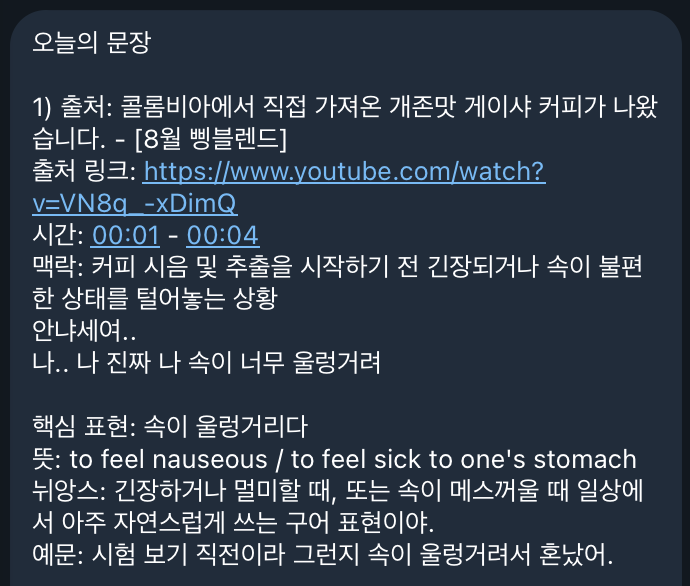
Being able to interface with an agent in a chat app like Telegram allows me to keep the conversation going. If something doesn’t make sense, I can ask for more explanation or examples, just like I would with a private tutor. It all happens in a familiar chat that’s easy to dip into throughout the day.
Next steps
Adding text-to-speech (TTS) so the tutor can send short audio clips of the expressions and example sentences but use native like audio (similar to how ChatGPT sounds). This would let me hear how they sound and fit a little listening practice into my day through the same chat. I can see future iterations growing to support practising output too, with speech-to-text (STT) letting me send voice messages and get feedback on what I’ve said.